Let’s get the obvious out of the way before we get started. Cloaking is the practice of showing different content experiences to users than you would to a search engine with the intent of manipulating performance in search engines. The practice is against Google’s guidelines.
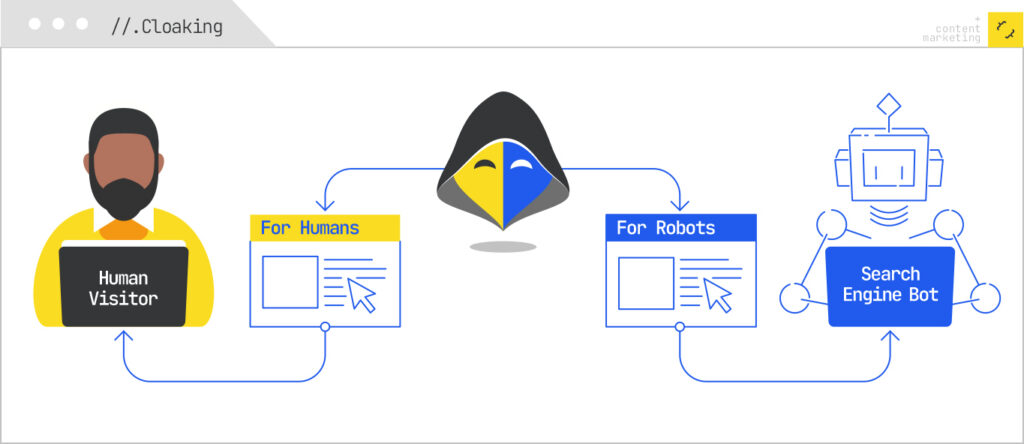
You should not cloak for Google if you want to remain in their index.
That said, ChatGPT does not have guidelines. And, ChatGPT’s “crawlers” (or agents) don’t render content. Google is rewarding information gain, but ChatGPT is also the mechanism by which your competitors will quickly steal your content and republish it.
So, why make it easier for them?
When Cloaking Makes Sense for LLMs
It baffles me that generative AI companies spend billions in compute on training models and inference, but draw the line at rendering JavaScript and caching webpages. However, therein lies our opportunity.
The data on this isn’t even close. Vercel and MERJ analyzed over 500 million GPTBot fetches and found zero evidence of JavaScript execution. ClaudeBot fetches JS files about 24% of the time and GPTBot about 11.5% — but neither one runs them. A separate analysis of 23 major AI crawlers found that 69% of them can’t execute JavaScript at all. Googlebot renders. Bingbot renders. Everyone else — GPTBot, ChatGPT-User, OAI-SearchBot, ClaudeBot, PerplexityBot, Bytespider, CCBot, and Meta-ExternalAgent gets only the raw initial HTML and moves on.
Consider a webpage where you’ve published a wealth of original data like a proprietary benchmark study, a dataset you spent six months collecting, an internal survey of 2,000 practitioners, or a unique framework you’ve assembled from years of client work. The kind of content that took real time and money to produce, and that nobody else has.
I can easily run a prompt like this {read this page, extract all the data, and write a new version of it for [site]}.
Now your wonderful unique content is mine and your information gain advantage has disappeared.
JavaScript Cloaking for LLMs
The idea here is not that we want to show something to ChatGPT that users don’t see. Although you could, because white on white text or simply adding text based on user agent are viable tactics.
What I’m proposing is removing certain content from the page to keep your advantage.
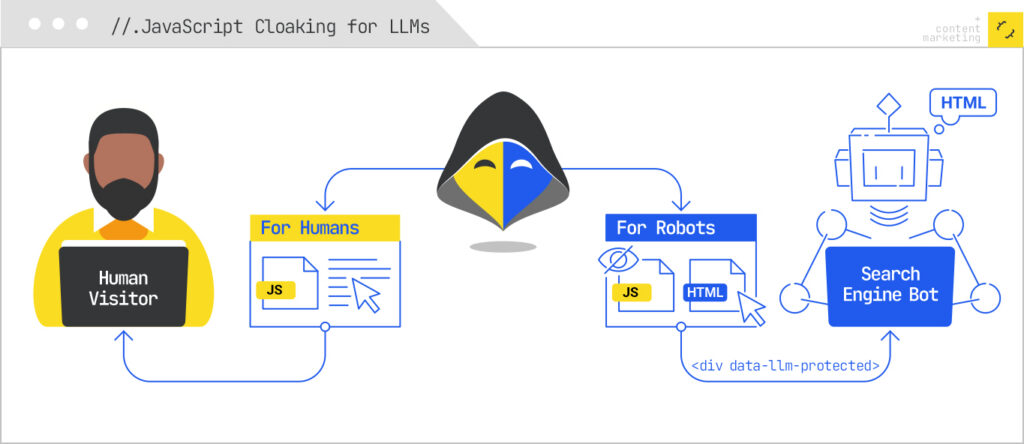
Effectively, what we’re doing is marking up content with specific classes and only client-side rendering those blocks. Then we simply block the JS file we’re using for all the LLM user agents.
Google and Bing are unaffected here while ChatGPT, Perplexity, et al will never see the content.
The mechanic works because the entire AI crawler ecosystem (excluding Gemini, which rides on Google’s infrastructure) is stuck operating like it’s 2010. They send an HTTP request, take the initial HTML response, and leave. If your “differentiator” content lives behind a <div data-llm-protected> that gets populated by a JS file you’ve blocked for those user agents, the crawler quite literally cannot see it. To them, that section of the page does not exist. Meanwhile, real users in browsers, and Googlebot, which renders, get the full experience.
This is the inverse of every cloaking conversation we’ve had for the last 20 years. Historically, the question was “how do I show search engines content I’m hiding from users?” Here, it’s “how do I show users content I’m hiding from a crawler that doesn’t deserve to have it?”
Serving Pages as Markdown Improves Speed
When a page is slow several AI crawlers return a 499 response and it’s not eligible for inclusion as part of the answers or citations. Serving pages as markdown yields faster TTFB and improves eligibility.
Cloudflare’s own data on this is informative: the HTML version of their own announcement post weighed in at 16,180 tokens, while the Markdown version was 3,150. That’s an 80% reduction in what the crawler has to chew through. Less to download, less to parse, faster TTFB, and a much higher chance you actually clear the timeout window and get cited.
Cloudflare ships this as a feature now (“Markdown for Agents”), but you don’t need their managed product to do it. You need a Worker that responds with Markdown when the user agent is an LLM and HTML the rest of the time. We’ll build exactly that below.
Save Your Advantage, Cloak for Large Language Models
To recap: the AI crawler ecosystem doesn’t render JavaScript, doesn’t follow Google’s guidelines (because they aren’t Google), and is actively used by your competitors to harvest and rewrite your work. There is no policy reason to feed it your best content, and there is a meaningful speed-and-citation reason to serve it Markdown when you do feed it something. If you’ve spent real money producing original data, frameworks, or research, the default of “let every AI crawler take it for free, in full, while my competitor reposts it on their domain by Tuesday” is not a strategy — it’s an oversight.
Here’s how to fix it with Cloudflare Workers.
Step 1: Set up a Worker on your zone
If you’re already on Cloudflare, this is the easy part. Install Wrangler, authenticate, and create a new Worker:
					<xmp>npm install -g wrangler
wrangler login
wrangler init llm-cloaker
cd llm-cloaker</xmp>
In wrangler.jsonc, set the route to your domain (or a path pattern, if you only want to apply this to specific sections):
Step 2: Detect LLM user agents
					<xmp>{
  "name": "llm-cloaker",
  "main": "src/index.ts",
  "compatibility_date": "2025-03-07",
  "routes": [
    { "pattern": "yoursite.com/*", "zone_name": "yoursite.com" }
  ]
}
</xmp>
The Workers fetch handler gives you the request headers directly. Build a list of the user agents you want to treat as LLM traffic. The current list worth covering:
					<xmp>const LLM_USER_AGENTS = [
  "GPTBot",            // OpenAI training
  "ChatGPT-User",      // OpenAI user-triggered fetch
  "OAI-SearchBot",     // OpenAI search/citations
  "ClaudeBot",         // Anthropic
  "anthropic-ai",      // Anthropic (legacy)
  "PerplexityBot",     // Perplexity
  "Perplexity-User",   // Perplexity user-triggered
  "CCBot",             // Common Crawl (training data for many models)
  "Bytespider",        // ByteDance
  "Meta-ExternalAgent",// Meta
  "Amazonbot",         // Amazon
  "Applebot-Extended", // Apple AI training (NOT regular Applebot)
  "Google-Extended",   // Google AI training (NOT Googlebot)
  "Diffbot",
  "cohere-ai",
];

function isLLMAgent(ua: string): boolean {
  if (!ua) return false;
  return LLM_USER_AGENTS.some(bot => ua.includes(bot));
}

</xmp>
A note on the two important exclusions: do not put Googlebot or Bingbot on this list. Google-Extended and Applebot-Extended are the AI-training agents. Those are separate from the regular search crawlers, and those are the ones you want to treat as LLMs.
Step 3: Block the protected JS file for LLM agents
This is the cloaking mechanic. Pick a filename you’ll use for the JS that hydrates your protected content. It could be something like /js/protected-content.js. The Worker returns 404 (or an empty 200) for that file when the requester is an LLM, and passes through normally for everyone else:
					<xmp>export default {
  async fetch(request: Request): Promise<Response> {
    const ua = request.headers.get("User-Agent") || "";
    const url = new URL(request.url);
    const isLLM = isLLMAgent(ua);

    // Block the protected JS file for LLM crawlers
    if (isLLM && url.pathname === "/js/protected-content.js") {
      return new Response("", {
        status: 404,
        headers: { "Cache-Control": "no-store" }
      });
    }

    // ... continued in Step 4
    return fetch(request);
  }
};
</xmp>
On the page itself, wrap your protected content in a container that’s empty in the source HTML and gets populated client-side by protected-content.js. Real users execute the JS and see the content. Googlebot executes the JS (it renders) and sees the content. Every LLM crawler gets a 404 for the JS file, never executes it, and sees an empty container.
Step 4: Serve Markdown to LLM agents on content URLs
Same Worker, second responsibility. When an LLM agent requests an HTML page, fetch the origin response and convert it to Markdown before returning. There are a few ways to do this — the cleanest is to maintain pre-generated .md versions of your important pages and serve those, because runtime HTML-to-Markdown conversion can be sloppy and adds latency (which defeats the point):
					<xmp>// Pre-generated approach: if you have /post/foo.html, also publish /post/foo.md
async function serveMarkdownIfAvailable(
  request: Request,
  url: URL
): Promise<Response | null> {
  const mdUrl = new URL(url.toString());
  // Map /any/path or /any/path/ to /any/path.md
  mdUrl.pathname = mdUrl.pathname.replace(/\/$/, "") + ".md";

  const mdResponse = await fetch(mdUrl.toString(), {
    headers: request.headers
  });

  if (mdResponse.ok) {
    return new Response(mdResponse.body, {
      status: 200,
      headers: {
        "Content-Type": "text/markdown; charset=utf-8",
        "X-Robots-Tag": "noindex, nofollow",
        "Cache-Control": "public, max-age=3600"
      }
    });
  }
  return null;
}
</xmp>
Wire it into the main handler:
					<xmp>export default {
  async fetch(request: Request): Promise<Response> {
    const ua = request.headers.get("User-Agent") || "";
    const url = new URL(request.url);
    const isLLM = isLLMAgent(ua);

    // 1. Block protected JS for LLM agents
    if (isLLM && url.pathname === "/js/protected-content.js") {
      return new Response("", { status: 404 });
    }

    // 2. Serve Markdown to LLM agents for HTML pages
    const isHtmlRequest = !url.pathname.match(
      /\.(js|css|png|jpg|jpeg|gif|svg|webp|ico|woff2?|mp4|pdf)$/i
    );
    if (isLLM && isHtmlRequest) {
      const md = await serveMarkdownIfAvailable(request, url);
      if (md) return md;
    }

    // 3. Everyone else gets the normal page
    return fetch(request);
  }
};
</xmp>
If you don’t want to pre-generate Markdown, you can convert HTML to Markdown at the edge using HTMLRewriter plus a small Turndown-style transformer, or just enable Cloudflare’s “Markdown for Agents” feature and let it do the conversion for you. Pre-generation produces better output. Runtime conversion is faster to ship.
Step 5: Deploy and verify
<xmp>wrangler deploy</xmp>
Then verify both behaviors. You want to confirm that an LLM user agent gets the cloaked behavior and a normal browser gets the full page. cURL is the fastest way:
					<xmp># Should return 404 (or empty)
curl -A "GPTBot/1.2" https://yoursite.com/js/protected-content.js -I

# Should return Markdown
curl -A "GPTBot/1.2" https://yoursite.com/your-best-post -I

# Should return the normal HTML page with the JS file accessible
curl -A "Mozilla/5.0 (Macintosh; Intel Mac OS X 10_15_7)" \
  https://yoursite.com/your-best-post -I
</xmp>
Practical Notes Before You Ship
Here are some things to think about before you deploy this cloaking technique all willy-nilly:
- Don’t cloak content that needs to rank in AI Overviews or ChatGPT search. This technique is for your moat: proprietary data, original research, your highest-effort frameworks. Your top-of-funnel SEO content should still be fully visible to LLMs, because being cited is the goal for that content. Cloak the asset, not the awareness piece.
- Spoofers exist. A determined competitor will scrape with a Chrome user agent, not GPTBot. User-agent cloaking stops the lazy 95% of automated extraction (which is most of it, including the actual training and citation crawlers). For the determined 5%, you need bot management, rate limiting, and Cloudflare’s verified-bot signals. That’s a whole nother post.
- Test what Googlebot sees. Run your pages through Google’s URL Inspection tool after deploying. The protected content should appear in the rendered HTML. If it doesn’t, you’ve broken your SEO, and that is a much bigger problem than an AI crawler eating your data.
- Update your user agent list monthly. New LLM crawlers ship constantly. The list above is current as of this writing. Six months from now it won’t be.
That’s the whole technique. Forty lines of Worker code, a naming convention for one JS file, and an optional build step that emits Markdown alongside your HTML. The result is that the content you spent real money producing stays yours, your information gain advantage stays intact, and the bots that were going to feed it to your competitor by next week get a polite empty container instead.